Can you run Claude or ChatGPT locally?
Talk · 26 Sep 2026 · Abu Dhabi, UAE
You cannot run Claude or ChatGPT on your own servers, but you can run open models that come close. This talk covered five machines, from a desk-sized AI PC to an eight-GPU tower, with the model each runs, how fast it answers and how many staff it serves.
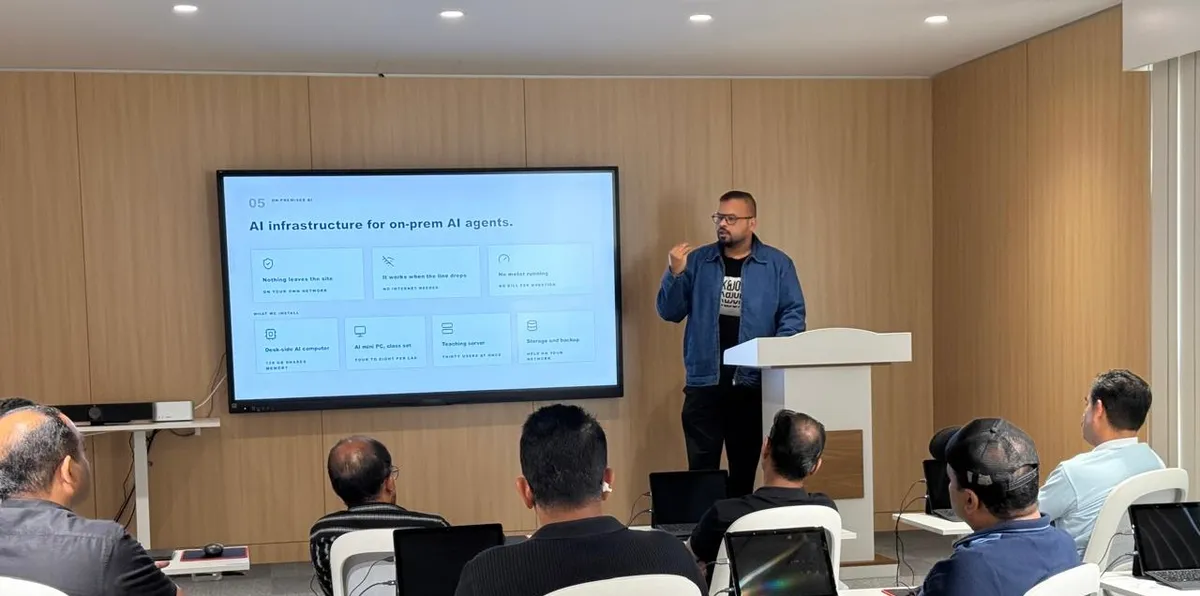
Our corporate AI session on running AI agents on hardware inside your own building.
You cannot run the versions you use online. Anthropic has never released Claude's model files, and OpenAI does not release the models behind ChatGPT, so both run only on their makers' servers.
You can run models that come close. OpenAI itself has published gpt-oss-120b, which anyone can download and run on their own machine. DeepSeek, Qwen and GLM publish their models too. On SWE-bench Pro, a test of fixing real software issues, GLM-5.2 scored 62.1%, ahead of GPT-5.5 at 58.6%.
For coding, your developers can use DeepSeek Harness, a free, open-source coding agent that DeepSeek released in August 2026. It reads and edits files, runs commands and works through multi-step tasks. It can be pointed at a model running on your own machine, such as DeepSeek V4 Flash on the dual-GPU workstation below, so the code stays inside your building. Its default web search calls DeepSeek's online service, so we switch that off for a fully local setup. It is still a developer preview, so expect changes.
Why run AI on your own hardware
At a recent Zeta42 corporate AI session, we covered how to run AI agents on computers inside your own building. This article follows on from that session. It covers the hardware: which machine to choose, which AI model it can run, how fast it answers and how many staff can use it at once.
Many organisations want AI to work with contracts, HR files, financial records or client data. Company policy or a client contract often rules out sending that data to an outside AI service. A model on your own hardware avoids this.
An AI agent is a model that reads files, follows the steps you set and hands back finished work. Typical jobs for an agent running on site include:
- Reading incoming contracts or invoices and filling in the fields your systems need
- Answering staff questions from your own policy manuals and procedures
- Drafting replies to customers on WhatsApp or email, in Arabic and English
- Summarising long reports and meeting notes
How company data ends up in public AI tools
In 2023, Samsung engineers pasted confidential source code into a public AI chatbot to check it for errors. It happened three times within a month, and Samsung then banned AI tools on work devices across one of its largest divisions.
The situations below are examples we wrote to show how this plays out day to day. They are not real cases, but most managers will recognise them.
- Finance. An analyst pastes a supplier contract into a free AI chatbot to summarise it, then uploads the quarterly figures to build a chart. Two confidential files now sit on servers the company does not control.
- HR. A manager uploads a salary sheet and three performance reviews to an AI tool to rewrite the feedback more politely. The employees never agreed to their records leaving the company.
- Legal. A lawyer drafts a reply using a client's case file in a personal AI account. The client's contract says no third party may process its documents.
- Spending. Five teams sign up for different AI tools on company cards. At the end of the quarter, finance finds per-seat fees and usage charges that nobody approved or tracked.
- Operations. A WhatsApp customer desk runs on a cloud AI service. The office internet goes down for an afternoon and the replies stop.
- Staff leaving. An employee resigns. A year of chats with an AI tool, including client names and pricing, stays in their personal account.
In each case, someone was trying to get work done faster. With company AI on your own hardware, they can do the same work and the files stay on your network.
What changes when the AI runs on site
Three things change when the model runs on a machine in your building:
- Your data stays on your own network.
- It keeps working when the internet is down.
- There is no charge per user or per question. You pay for the hardware once.
Working offline matters most for agents that run all day, such as a document intake line or a WhatsApp desk. They carry on during an internet outage, and replies do not wait on an outside service.
Cost depends on how much you use it. For light use, a hosted AI service usually costs less than buying hardware. One published comparison priced a four-GPU build at about USD 52,000 and worked out that the same money buys around 11.8 billion tokens of output from a hosted service at its list price. On-site AI pays off when the data cannot leave the building, or when many staff use it every day.
A typical setup has four parts:
- A desk-side AI computer, or a workstation for larger teams
- AI mini PCs as a class set for training rooms, four to eight per lab
- A server that answers many staff at once over the office network
- Storage and backup on your own network
What decides what a machine can run
Memory size decides which models fit, and memory speed decides how fast they answer.
Model size is counted in parameters, in billions. In the compressed 4-bit form most people run, a model needs a little over half a gigabyte of memory per billion parameters, plus working room for the conversation. gpt-oss-120b, for example, takes about 63 GB.
Speed is counted in tokens per second. A token is about three quarters of a word. At 15 to 25 tokens a second the text keeps pace with reading, and above 50 it appears almost at once.
Many current models use only a small part of themselves for each word. That is why model size alone does not predict speed. On the same compact AI PC, Llama 3.1 70B, which uses all of its 70 billion parameters for every word, ran at 5 tokens a second. Qwen3-Next 80B, which uses about 3 billion per word, ran at 43.
Memory speed explains most of the gap between the machines. The compact AI PC reads its memory at about 256 GB a second. One RTX PRO 6000 graphics card reads at about 1.8 TB a second, roughly seven times faster, so the same model answers several times faster on the card.
Long documents need extra memory and extra time. On one RTX PRO 6000, raising the conversation length for Qwen3.5 122B from about 8,000 tokens to 262,000 tokens used 6 GB more memory and slowed replies from 100 to 80 tokens a second. The model also reads the whole document before it starts to answer. On the dual-GPU workstation, a 64,000 token document, around 125 pages, took about 5.5 seconds before the first word appeared.
Five machines and what they can do
Every machine we supply for on-site AI has at least 128 GB of memory. Speeds below are for one user. Users are the number of people who can ask at the same moment and still read the reply as it appears, and the size of team that can share the machine through the day.
Compact AI PC
A mini PC about 15 cm square, with an AMD Ryzen AI Max+ 395 or PRO 495 and 128 or 192 GB of memory shared between the processor and the graphics.
- 128 GB: runs Qwen3-Next 80B at about 40 tokens a second. 2 to 3 people at once, a team of about 10.
- 192 GB: runs gpt-oss-120b at about 30 to 55 tokens a second. 3 to 4 people at once, a team of 10 to 15.
It suits one department, a pilot project or a training room.
In one published test it drew about 125 W while answering, close to an ordinary desktop PC, and it needs no special cooling. Its memory is slower than a graphics card's, so replies slow down quickly once several people use it at the same time.
Single-GPU workstation
An 11 litre desktop with one NVIDIA RTX PRO 6000 (96 GB) and 128 GB of system memory. It runs Qwen3.5 122B at about 100 tokens a second, for 8 to 10 people at once and a team of 30 to 50.
This is the step up for a department that shares one AI assistant all day. It fits under a desk, and the graphics card can be liquid cooled for quieter running in an office.
Dual-GPU workstation
An 18 litre desktop with two RTX PRO 6000 Max-Q cards (192 GB in total) and an Intel Xeon Silver 4510. It runs DeepSeek V4 Flash, a 284B model, at about 100 tokens a second. In a published test it served 5 people at once in long conversations and about 75 with short questions. That is a team of 20 to 25 for everyday chat.
DeepSeek V4 Flash scores close to the largest open models. In its maker's tests it scored 79.0 on SWE-bench Verified, a test of fixing real software issues, against 80.6 for DeepSeek's own 1.6 trillion parameter model. Two 10 GbE network ports let it serve many desks over the office network.
Four-GPU tower
A floor-standing tower with two Intel Xeon Gold 5318Y processors, 256 GB of system memory and up to four GPUs. With four RTX PRO 6000 cards (384 GB) it runs a pruned 594B version of GLM-5.2 at about 80 tokens a second, for 5 to 10 people at once and a team of 25 to 50.
GLM-5.2 is one of the strongest open models for coding and long, multi-step tasks. The full model needs about 410 GB, more than four cards hold, so this setup runs a trimmed version with some rarely used parts removed. The trimmed version scores a little lower and is more likely to repeat a step on long tasks, so we set a limit on how many steps an agent may take. The tower draws up to 2,000 W and belongs in a server room or a ventilated cabinet.
Eight-GPU tower
A floor-standing tower with up to eight GPUs and 128 GB to 4 TB of system memory. With eight RTX PRO 6000 cards (768 GB) it runs GLM-5.3, a 744B model, at about 100 tokens a second. That serves 10 to 15 people at once and a team of 50 to 75.
At this size the machine is shared infrastructure, like a file server. In one published test, eight cards drew about 1,550 W while answering and about 700 W when idle with a model loaded. Limiting each card to 300 W made almost no difference to speed. It needs its own power circuit and a server room.
How to choose
Start from the work and the team size, then pick the machine. Most teams do not need the largest model.
As a rough guide:
- A pilot project or one small department starts on the compact AI PC.
- A department that uses AI all day moves to the single-GPU workstation.
- Work that needs a stronger model, such as code, finance or legal review, points to the dual-GPU workstation.
- The towers are for use across the whole organisation, or for many agents running at once.
Other points to keep in mind:
- A smaller model on a larger machine serves more people. On one RTX PRO 6000, gpt-oss-120b answers a single user at about 200 tokens a second, twice the speed of Qwen3.5 122B on the same card.
- Long documents reduce the number of people a machine can serve at once. In the dual-GPU test, 75 people could ask short questions together, but only 3 could have documents of around 125 pages processed at the same time.
- Adding graphics cards does not always add speed. Without a direct link between the cards, one test found a model ran faster on four cards than on eight.
- The figures here are estimates from published tests. Before buying, run a short test on the actual machine with your own documents and your expected number of users.
How we set it up
- We visit, look at the work you want the AI to do and size the machine to your team.
- We install it on your network and connect it to your user accounts.
- We load the models, your documents and the tools your staff will use.
- We run the first training sessions on it with your team.
- We hand over a written guide, an update schedule and a number to call.
Staff also need to know how to use the system, so each setup can come with training. Programmes run from a one-day introduction for management to a four to six week course for a department, at our campus in Al Nahyan, at your office or online.
Talk to us
If your team wants to use AI but cannot send its data to an outside service, message us on WhatsApp at +971 58 587 8942 or email [email protected]. We can size a setup for your team and show you how it works.
Album
Coming up
Work Smarter, Powered by AI
Sat, 24 Oct 2026 · 11:00 – 14:00 · AED 199