AI infrastructure
An AI lab that never calls the internet.
The question that decides most of these projects is not what a model can do. It is where the data is allowed to sit while the model does it.
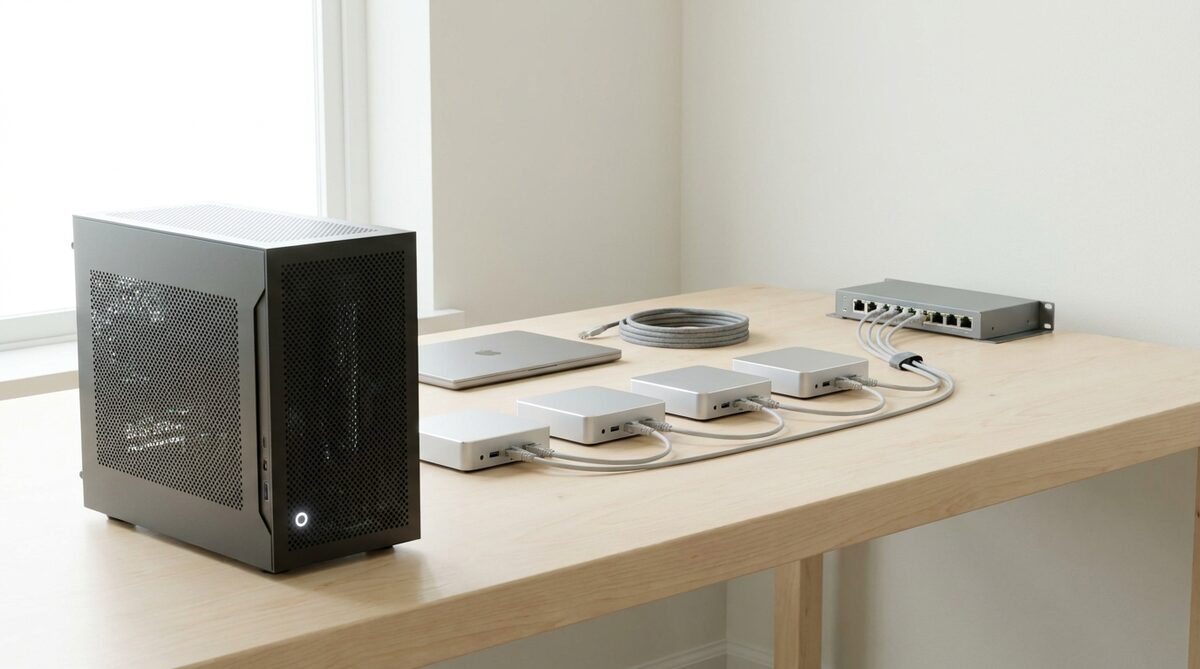
Desk-side machines that hold and run real models on your own network. Nothing leaves the building, no account for a thirteen-year-old, and no meter running.
Why it comes up
The constraint decides the architecture.
For a school that means a child's work and face. For a business it means whatever is in the documents you would not email. Once that constraint is on the table, a great many architectures stop being available, and it is better to know that first.
- Work, faces and data stay on a machine in your building. No third-party terms and nothing to disclose.
- A lesson or a workflow built on a cloud service stops when the internet does. This one does not.
- You are not billed by the question, and there are no credits to top up when a class gets interested.
- The model, the weights and the reason it slows down are all in the room.
What we install
What gets installed.
So the answer is machines you own, in a room you control, running models you can inspect. Nothing goes out, nothing is metered, and nothing depends on a service staying available or staying priced the way it is today.
Desk-side AI computer
Around 128 GB of memory shared between processor and graphics, so it loads models a normal graphics card cannot hold. One per lab.
AI mini PC, class set
The same shared-memory idea in a small box that also works as an ordinary desktop. Four to eight per lab.
Teaching server
Set up to serve models to every bench over the local network, for thirty people querying at once.
Storage and backup
Datasets, checkpoints and projects held on your network and backed up.
How we set it up
Five steps, sized at the visit.
- 01
Size it
At the visit. Numbers and workload decide one machine or several.
- 02
Install
Racked or on a shelf, on your network and directory.
- 03
Load
The model library, the datasets and the notebooks.
- 04
Test
We run the first sessions on it and fix what breaks.
- 05
Hand over
Written runbook, update schedule and a number to ring.
Who asks
Three buyers, one constraint.
Schools
A child's work and face stay in the building. No account for a thirteen-year-old, no meter running when a class gets interested.
Robotics labs for schoolsUniversities
A teaching server the whole bench can query at once, and a model library students can take apart.
University and vocational labsGovernment and enterprise
Documents that cannot be emailed cannot go to a cloud either. Agents and workflows on hardware you own.
Government and enterpriseQuestions
What buyers ask.
Which models can run on it?+
Open models from Hugging Face and others, sized to the machine. The desk-side computer's shared memory loads models a normal graphics card cannot hold.
Does it need the internet at all?+
Not to run. Updates to the model library and the software are loaded on a schedule you agree, from a source you approve.
Who maintains it?+
You do, with the runbook, and we do, on the update schedule and the number to ring. Service from Abu Dhabi across the six GCC countries.
Is it cheaper than the cloud?+
Up front, no. It earns that back only if the constraint is real: data that cannot leave, a line that cannot stop when the internet does, or a class that would otherwise be metered by the question. Where the cloud is fine, we will say so.
It is not the right answer for everyone. Where the cloud is fine, we will say so, because the on-premise version costs more up front and earns it back only if the constraint is real.